I would like to create a local network for development. Most for experimental purposes and homework. The idea is to replicate a typical network that is created in an office or even in most cases in production environments.
The requirements for such a network are very simples
- All the services shall have a static IP Address
- There's only one service that can interact with the docker host. That is, is visible to host with a specific dns name or simply with
http://(localhost):(port) - the network may be used in multiple docker compose files
- the network shall allow outbound traffic to internet for all the services but for inbound only the
proxyservice shall receive traffic from the host.
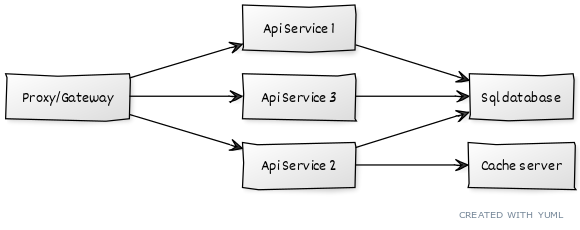
In this picture there is a very simple representation of the network. please note that I only want to include the orange and red boxes in the network
Implementation
I wish to use two docker compose files to describe the implementation
- backend servers (sql database, caching, etc.)
- application services (apis and others)
Backend servers
For backend servers I have created a docker compose file which I summarize in the following
version: "3.8"

networks:
  my-backend-network:
    name: my-network
    driver: bridge
    ipam:
      config:
        - subnet: 10.90.0.0/16
          gateway: 10.90.0.1

services:
  sql-database:
    [... other configs removed for brevity ...]
    networks:
      my-backend-network:
        ipv4_address: 10.90.1.11
Application services
For application services I have created a different docker compose file which I summarize in the following
version: "3.8"

networks:
  my-apps-network:
    external:
      name: my-network

services:
  proxy:
    [... other configs removed for brevity ...]
    ports:
      - "9001:80"
    networks:
      my-apps-network:
        ipv4_address: 10.90.2.11
  api-service-2:
    [... other configs removed for brevity ...]
    ports:
      - "9101:80"
    networks:
      my-apps-network:
        ipv4_address: 10.90.2.12
This configuration works however it is not exactly what I wanted to achieve. In details:
- Every single API service can also be reached by the docker host which is something I would like to avoid
- The proxy, which is correctly reached by the docker host through http://localhost:9001 is not able to route through the internal network using internal docker names. I mean for example:
http://localhost:9001 -> http://api-service-2:80
I read this question but it sounds to me that the real problem is to allow the proxy service to be able to route through two different network. Which I don't really understand how to implement it

You can accomplish most of what you're asking for with only basic Docker options.
Containers are normally accessible from outside Docker only if they have
ports:declared. These aren't required (or used) for connections between containers. So for the single service that can receive inbound connections, declareports:, but delete them from every other container.This is standard Docker behavior, provided
ports:are set up as above.You can assign an explicit name to Compose networks if required. In particular, this means that you can give an explicit name to the
defaultnetwork. See Networking in Compose in the Docker documentation, especially the "Configure the default network" and "Use a pre-existing network" sections.You never need this. From outside Docker, the container-internal IP addresses are usually unreachable, whether you specify them directly or not. Between containers, so long as they're on the same network, Docker provides DNS service that lets you look up another container's IP address by name.
(Compare this to a physical network. Again, it's common to use DHCP to dynamically assign IP addresses to hosts, and the network-management layer ensures the assigned addresses don't conflict.)
Let's map this to the example you show above. You declare the network in the "backend" file, which is fine. If its Compose name is
default, then containers that don't declarenetworks:will automatically attach to it.With this setup, the proxy service could use something like an Nginx
proxy_pass http://api-service-2directive to reach the backend on the default unencrypted HTTP port 80, and the backend could use something likesql-database:5432in its configuration to reach the database on the standard PostgreSQL port.