I want to get the directions from 2 points (origin and destination) i have written a simple function to get longitude and latitude.
it looks like this
const GetLongitudeFromAddress = (address) =>{
    var logLatApi = 'https://maps.googleapis.com/maps/api/geocode/json?address='+address+'&sensor=false&key=AIzaSyBsy6x3mTXbPQ52qk6XMI9u1NgMfn9-YNE';
    var header = {
        'Accept': 'application/json',
        'Content-Type': 'application/json'
    };
    fetch(
        logLatApi,{
            method : 'GET',
            headers : header
        }
    ).then((response) => response.json())
    .then((responseJson)=>{
        if(responseJson.status ==='OK')
        {
            this.setState({longitude: responseJson.results[0].geometry.location.lng});
            this.setState({latitude: responseJson.results[0].geometry.location.lat});
        }
    })
}
Now i want to use it in inputText Like this
            <TextInput
            style={styles.input}
            placeholder="Origin"
            onChangeText={text => GetLongitudeFromAddress(text)}
            />
it does not seem to work, i get this As error possible promised handled rejection which looks like this image below
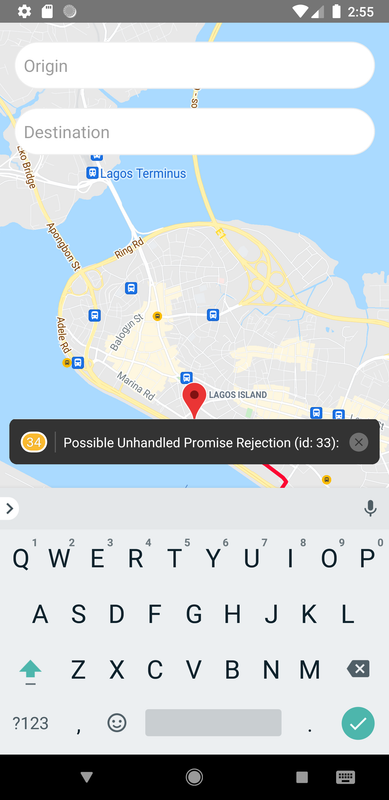
How can I use this with useState? My code is looking like this below :
import React , {useState, useEffect} from 'react';
import {StyleSheet, View, Dimensions, TextInput} from 'react-native';
import MapView , { Marker , Polyline } from 'react-native-maps';
import MapViewDirections from 'react-native-maps-directions';
import { GooglePlacesAutocomplete } from 'react-native-google-places-autocomplete';

const ShowMap =() =>{

    const GetLongitudeFromAddress = (address) =>{
        var logLatApi = 'https://maps.googleapis.com/maps/api/geocode/json?address='+address+'&sensor=false&key=AIzaSyBsy6x3mTXbPQ52qk6XMI9u1NgMfn9-YNE';
        var header = {
            'Accept': 'application/json',
            'Content-Type': 'application/json'
        };
        fetch(
            logLatApi,{
                method : 'GET',
                headers : header
            }
        ).then((response) => response.json())
        .then((responseJson)=>{
            if(responseJson.status ==='OK')
            {
                this.setState({longitude: responseJson.results[0].geometry.location.lng});
                this.setState({latitude: responseJson.results[0].geometry.location.lat});
            }
        })
    }

    const [coordinates] = useState([
        {
          latitude: 6.450430,
          longitude: 3.390460,
        },
        {
          latitude: 6.430980,
          longitude: 3.435880,
        },
      ]);

    return(

        <View style={styles.container}>
        <MapView
          style={styles.maps}
          initialRegion={{
            latitude: coordinates[0].latitude,
            longitude: coordinates[0].longitude,
            latitudeDelta: 0.0622,
            longitudeDelta: 0.0121,
          }}>
          <MapViewDirections
            origin={coordinates[0]}
            destination={coordinates[1]}
            apikey="AIzaSyBsy6x3mTXbPQ52qk6XMI9u1NgMfn9-YNE"
            strokeWidth={4}
            strokeColor="#FD0631"
          />
          <Marker coordinate={coordinates[0]} />
          <Marker coordinate={coordinates[1]} />
        </MapView>
        <View style={styles.inputView}>
                <TextInput
                style={styles.input}
                placeholder="Origin"
                onChangeText={text => GetLongitudeFromAddress(text)}
                />
                <TextInput
                style={styles.input}
                placeholder="Destination"
                onChangeText={text => GetLongitudeFromAddress(text)}
                />
            </View>
      </View>
    );
}


const styles = StyleSheet.create({
    container: {
      flex: 1,
    },
    maps: {
      width: Dimensions.get('screen').width,
      height: Dimensions.get('screen').height,
    },
    inputView:{
        backgroundColor: 'rgba(0,0,0,0)',
        position: 'absolute',
        top: 0,
        left: 5,
        right: 5
    },
    input: {
        height: 50,
        padding: 10,
        marginTop: 20,
        marginLeft: 10,
        marginRight: 10,
        fontSize: 18,
        borderWidth: 1,
        borderRadius: 35,
        borderColor: '#EEEEEE',
        backgroundColor: 'white',
    }
  });


export default ShowMap;
How do i go about this? How Can I use this GetLongitudeFromAddress to get the longitude and latitude from both feilds. Kindly assist

You need to have a button that will call the function
GetLongitudeFromAddresswhen pressed. Calling this function every change of your input text value will be costly as it will call geocoding requests everytime the function is called. I successfully modified your code to get the address from the input text then convert it using the function, then use the converted coordinates as input to MapViewDirections. Here's a sample code and a code snippet below with inline comments:Note: Kindly remove your API key in your code and please don't share it to public sites to protect your API key from unexpected usage.