I'm using groff version 1.22.4 to create a two-page letter. The first page has three columns, the second page has 2 columns.
The macros for printing columns 1-3 on the first page work as expected. The macro for starting the second page always gives a first line that is the width of the column on the previous page. 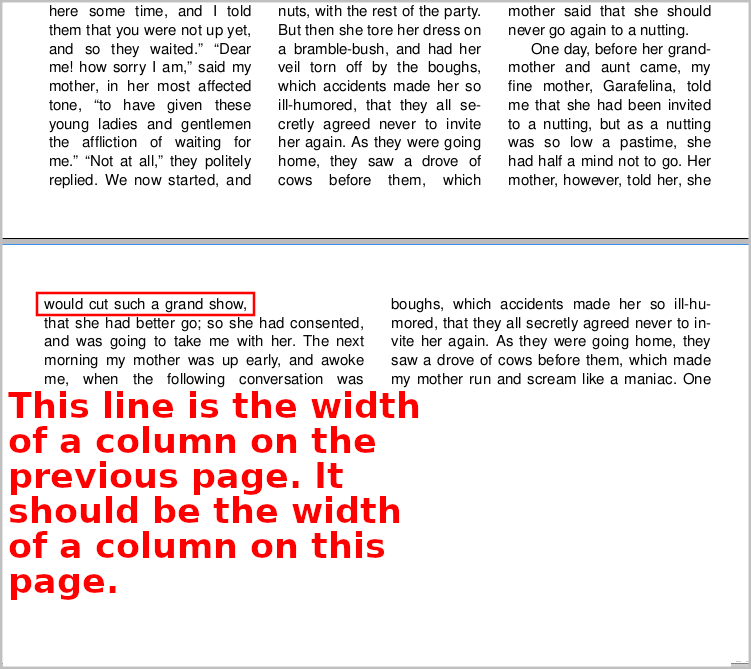 .
.
How can I get the first line on the second page to have the correct width?
Below is the groff:
.ll 2.25i \" Line length of a column 2.25 inches. Good for three columns.
.vs 15p \" 11 points between lines of text in the same paragraph
.ps 12 \" 12 point font size
.nr bottom-margin 0.75i \" Bottom margin
.de START-COLUMN-0
.  mk \" Mark top of column
.  wh -\\n[bottom-margin]u START-COLUMN-1 \" At bottom of 1st column, run next macro.
..
.de START-COLUMN-1
.  po +2.55in \" Add offset for second column.
.  rt \" Return to top of column.
.  wh -\\n[bottom-margin]u START-COLUMN-2 \" At bottom of 2nd column, run next macro.
..
.de START-COLUMN-2
.  po +2.55in \" Add offset for second column.
.  rt \" Return to top of column.
.  wh -\\n[bottom-margin]u START-PAGE-2 \" At bottom of 2nd column, run next macro.
..
.de START-PAGE-2 \"Page break.
'll 3.55i \" Line length of a column 3.55 inches. Good for two columns.
'bp \" Break page.
'po 0.5in \" left margin
'mk \" Mark top of column
'wh -\\n[bottom-margin]u END-PAGE-2 \" At bottom of 1st column, run next macro.
..
.de END-PAGE-2
.  po +3.85in \" Add offset for second column.
.  rt \" Return to top of column.
.  wh -\\n[bottom-margin]u \" Terminate at second column on second page.
..
.START-COLUMN-0
Lots of text here.

Posted as an answer, because I need a picture in it and the size of the comment is too large.
Are you sure? The result is completely different from what you describe. The second page is two columns, instead of the 1 column in your description.
When I run your code (GNU groff version 1.22.4), I get:
or as nroff:
I also get a single column on the second page, and not two columns as you have in the output.