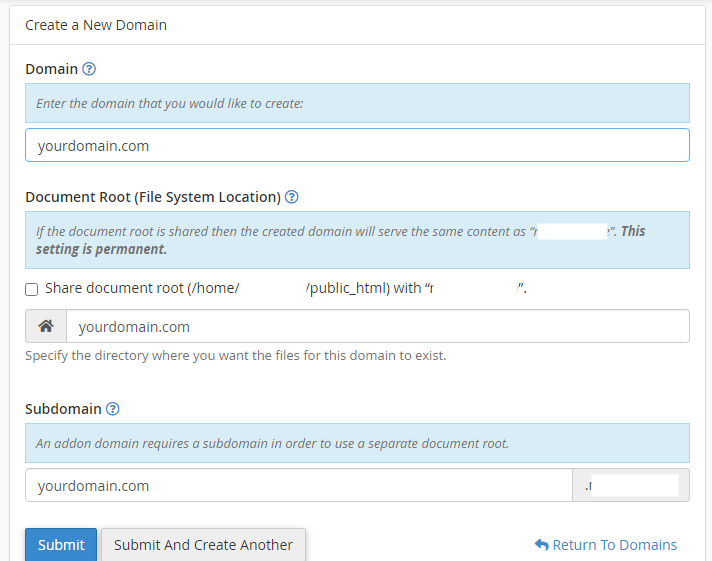
How do I add another domain but not to the public_html folder in cpanel?

690 Views Asked by At

When I try to add another domain to the account the public_html folder is already grayed out near the document root input. how can I put the domain as a sibling folder to the public_html folder?

What I see

So I will have 2 domains like this

1st domain - *root*/public_html/

2nd domain - *root*/anotherdomain.com/
2

There are 2 best solutions below

0
yortem On BEST ANSWER

A guy named cPanelRex from another place answered my question. I need to enable something from the higher-level account:

WHM >> Tweak Settings by the "Restrict document roots to public_html" toggle. https://docs.cpanel.net/whm/server-configuration/tweak-settings/#domains

5
Ali Ismaeel On

You can add it as Addon domain. In previous versions of Cpanel, the Addon domains had a separate tab underneath Domains tab, but in current versions all the domains are gathered in one place.

  1. Click "Domains" under the "Domains" section.
  2. Click the "Create A New Domain" button.
  3. Enter the domain name to add in the "Domain" text box.
  4. Deselect the "Share document root (/home/username/public_html) with “domain.tld”." option.
  5. Enter the directory where you want the files for this domain to exist.
  6. Click the "Submit" button.

Useful screenshot here