I'm using a zed m camera to take images/depths and convert them to 3d point cloud. I'm using my own algo to produce 3d point cloud (instead of using built-in functions) by using intrinsic and extrinsic matrices. I'm trying to produce two point cloud sets of two images taken by a left camera of zed m.
But the output point clouds don't overlap; if my algo (converting 2d image to 3d point cloud), extrinsic, and intrinsic matrices are correct, two point cloud sets should overlap each other.
For example, I take a picture and then rotate my camera (along z-axis) and take another picture. This is the output point cloud after I convert those two 2d images to 3d point cloud.
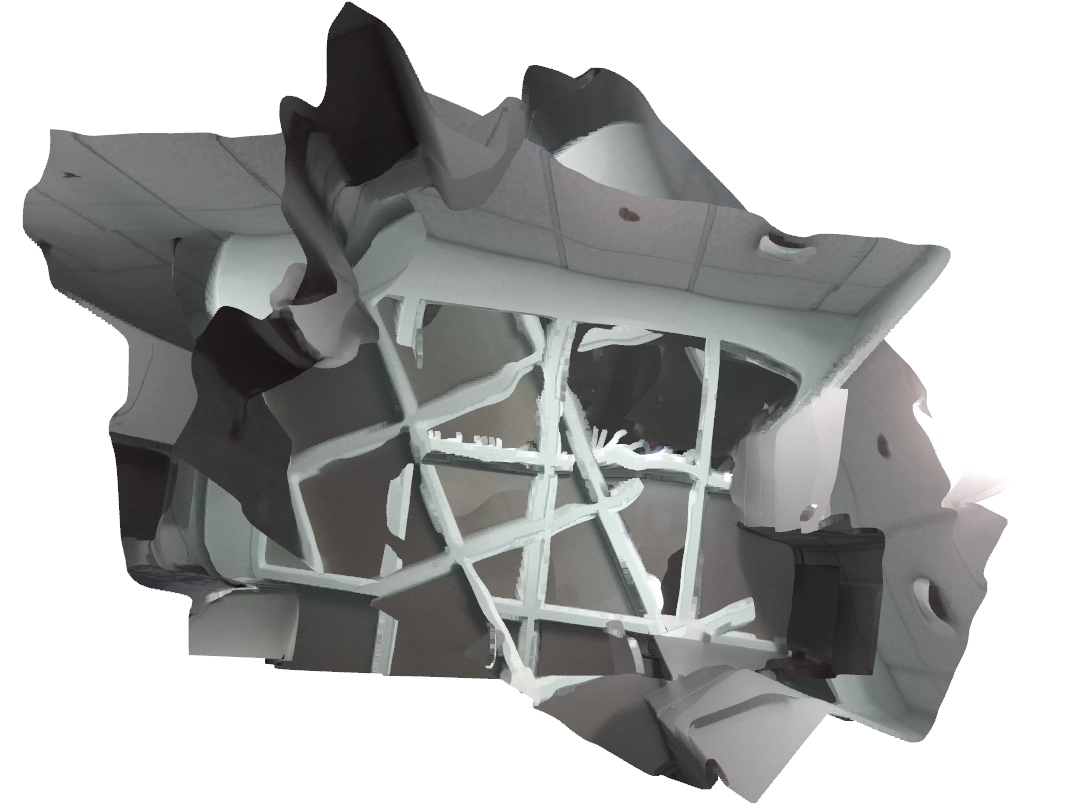
Are my extrinsic matrices wrong?
The following snippet has the basic setup to capture images and how I get extrinsic matrices.
# Basic Setup

zed = sl.Camera()

# Create a InitParameters object and set configuration parameters
init_params = sl.InitParameters()
init_params.camera_resolution = sl.RESOLUTION.HD720  # Use HD720 video mode (default fps: 60)
# Use a right-handed Y-up coordinate system
init_params.coordinate_system = sl.COORDINATE_SYSTEM.RIGHT_HANDED_Y_UP
init_params.coordinate_units = sl.UNIT.CENTIMETER  # Set units in meters

# Open the camera
err = zed.open(init_params)
if err != sl.ERROR_CODE.SUCCESS:
    exit(1)

# Enable positional tracking with default parameters
py_transform = sl.Transform()  # First create a Transform object for TrackingParameters object
tracking_parameters = sl.PositionalTrackingParameters(_init_pos=py_transform)
err = zed.enable_positional_tracking(tracking_parameters)
if err != sl.ERROR_CODE.SUCCESS:
    exit(1)

# Track the camera position during 1000 frames
i = 0
zed_pose = sl.Pose()  # the pose containing the position of the camera and other information (timestamp, confidence)

zed_sensors = sl.SensorsData()
runtime_parameters = sl.RuntimeParameters()
runtime_parameters.sensing_mode = sl.SENSING_MODE.FILL
# runtime_parameters.sensing_mode = sl.SENSING_MODE.STANDARD

# images will be saved here
image_l = sl.Mat(zed.get_camera_information().camera_resolution.width,
                 zed.get_camera_information().camera_resolution.height, sl.MAT_TYPE.U8_C4)
image_r = sl.Mat(zed.get_camera_information().camera_resolution.width,
                 zed.get_camera_information().camera_resolution.height, sl.MAT_TYPE.U8_C4)

depth_l = sl.Mat()


while i < 10:
    if zed.grab(runtime_parameters) == sl.ERROR_CODE.SUCCESS:
        # Get the pose of the left eye of the camera with reference to the world frame
        zed.get_position(zed_pose, sl.REFERENCE_FRAME.WORLD)
        # position of the camera
        zed.get_sensors_data(zed_sensors, sl.TIME_REFERENCE.IMAGE)
        zed_imu = zed_sensors.get_imu_data()

        # A new image is available if grab() returns SUCCESS
        zed.retrieve_image(image_l, sl.VIEW.LEFT)
        zed.retrieve_image(image_r, sl.VIEW.RIGHT)

        image_zed_l = image_l.get_data()
        image_zed_r = image_r.get_data()

        # get depth map
        zed.retrieve_measure(depth_l, sl.MEASURE.DEPTH)

        # do something...

        # The following code is my extrinsic matrix of the left camera.

        R = zed_pose.get_rotation_matrix(sl.Rotation()).r
        t = zed_pose.get_translation(sl.Translation()).get()

        world2cam_left = np.hstack((R.T, np.dot(-R.T, t).reshape(3, -1))) # -t bc t they give me is not really
        # translation of ext matrix. also np.dot(-R.T, -t) is for inversing ext mat.
        world2cam_left = np.vstack((world2cam_left, np.array([0, 0, 0, 1])))