I'm using Hpple to parse HTML of a website onto my app. The parsing is working great but instead of all the contents of the tr block to be in one cell, each of the td elements in the tr block are table cells of their own. Here's what I mean. The TR Block:
<tr>
                    <td>2</td>
                    <td>down 1</td>
                    <td>1</td>
                    <td>5</td>
                    <td>Justin Bieber</td>
                    <td>What Do You Mean?</td>
                </tr>
What it looks like in the app:
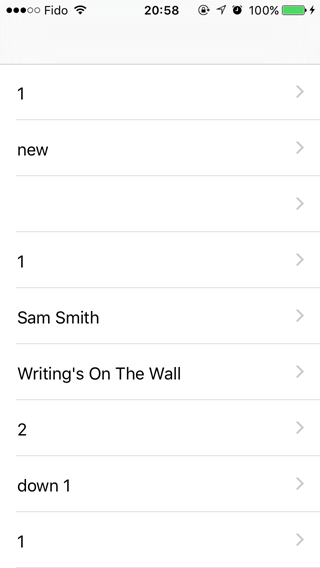
When I want it to actually look like this:

The code I'm using for the parsing looks like this:
 - (void)loadSongs {
// 1
NSURL *tutorialsUrl = [NSURL URLWithString:@"http://www.bbc.co.uk/radio1/chart/singles/print"];
NSData *tutorialsHtmlData = [NSData dataWithContentsOfURL:tutorialsUrl];

// 2
TFHpple *tutorialsParser = [TFHpple hppleWithHTMLData:tutorialsHtmlData];

// 3
NSString *tutorialsXpathQueryString = @"//tr/td";
NSArray *tutorialsNodes = [tutorialsParser searchWithXPathQuery:tutorialsXpathQueryString];

// 4
NSMutableArray *newTutorials = [[NSMutableArray alloc] initWithCapacity:0];
for (TFHppleElement *element in tutorialsNodes) {
    // 5
    Tutorial *tutorial = [[Tutorial alloc] init];
    [newTutorials addObject:tutorial];

    // 6
    tutorial.title = [[element firstChild] content];
   tutorial.peakPosition = ???;


}

// 8
_objects = newTutorials;
[self.tableView reloadData];
}

Try
NSString *tutorialsXpathQueryString = @"//tr[contains(td, *)]";See here for more functions: w3schools
This website for testing your xpath syntax
Hope it helps :)
Update:
The reason why you get nil is because you didn't get html data from your url instead of the XPath.
And the reason why you can't get the data is because APP Transport Security.
Please check this link: How do I load an HTTP URL with App Transport Security enabled in iOS 9?
Add the following to your plist file.
It should be working : )