I am seeking code to read a text file which is in packed decimal (Comp -3) numeric value which was created in main frames system and is 8 characters, but holds a 13 digit number in packed decimal format.
I came across below code
private Decimal Unpack(byte[] inp, int scale)
{
    long lo = 0;
    long mid = 0;
    long hi = 0;
    bool isNegative;

    // this nybble stores only the sign, not a digit.
    // "C" hex is positive, "D" hex is negative, and "F" hex is unsigned.
    switch (nibble(inp, 0))
    {
        case 0x0D:
            isNegative = true;
            break;
        case 0x0F:
        case 0x0C:
            isNegative = false;
            break;
        default:
            throw new Exception("Bad sign nibble");
    }
    long intermediate;
    long carry;
    long digit;
    for (int j = inp.Length * 2 - 1; j > 0; j--)
    {
        // multiply by 10
        intermediate = lo * 10;
        lo = intermediate & 0xffffffff;
        carry = intermediate >> 32;
        intermediate = mid * 10 + carry;
        mid = intermediate & 0xffffffff;
        carry = intermediate >> 32;
        intermediate = hi * 10 + carry;
        hi = intermediate & 0xffffffff;
        carry = intermediate >> 32;
        // By limiting input length to 14, we ensure overflow will never occur

        digit = nibble(inp, j);
        if (digit > 9)
        {
            throw new Exception("Bad digit");
        }
        intermediate = lo + digit;
        lo = intermediate & 0xffffffff;
        carry = intermediate >> 32;
        if (carry > 0)
        {
            intermediate = mid + carry;
            mid = intermediate & 0xffffffff;
            carry = intermediate >> 32;
            if (carry > 0)
            {
                intermediate = hi + carry;
                hi = intermediate & 0xffffffff;
                carry = intermediate >> 32;
                // carry should never be non-zero. Back up with validation
            }
        }
    }
    return new Decimal((int)lo, (int)mid, (int)hi, isNegative, (byte)scale);
}

private int nibble(byte[] inp, int nibbleNo)
{
    int b = inp[inp.Length - 1 - nibbleNo / 2];
    return (nibbleNo % 2 == 0) ? (b & 0x0000000F) : (b >> 4);
}
but above code fails saying bad sign nibble.
can anyone confirm if i am reading properly
 using (FileStream fs = new FileStream(pathSource, FileMode.Open))
            {
                using (StreamReader reader = new StreamReader(fs))
                {
                    List<decimal> list = new List<decimal>();

                    while (!reader.EndOfStream)
                    {
                        byte[] b = ASCIIEncoding.ASCII.GetBytes(reader.ReadLine());
                        list.Add(Unpack(b, 0));
                    }

                    reader.Close();
                }
            }
Note: it's not duplicated as I am looking for code that can read a file and pass a parameter to Unpack method.
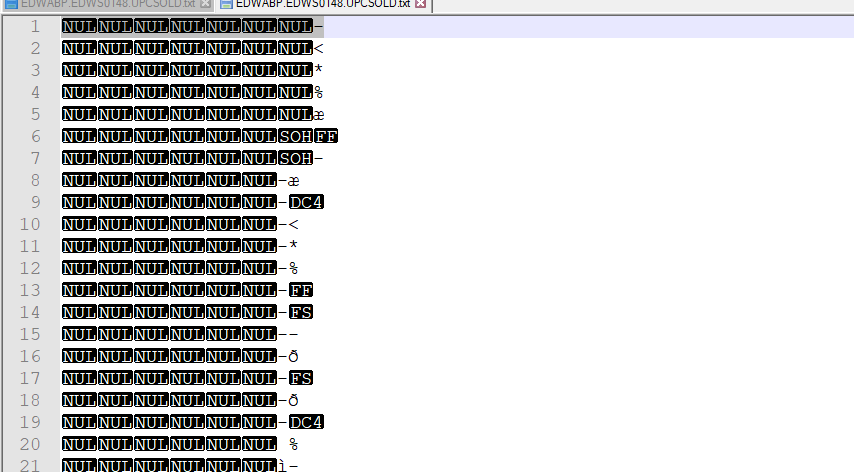
For reference I added how the data inside the file looks like:

The “ASCII transfer type” will transfer the files as regular text files. So files becoming corrupt when we transfer packed decimal or binary data files in ASCII transfer type. The “Binary transfer type” will transfer the data in binary mode which handles the files as binary data instead of text data. So please use Binary transfer type for your case.
Reference : https://www.codeproject.com/Tips/673240/EBCDIC-to-ASCII-Converter
Once your file is ready, here is the code to convert packed decimal to human readable decimal.