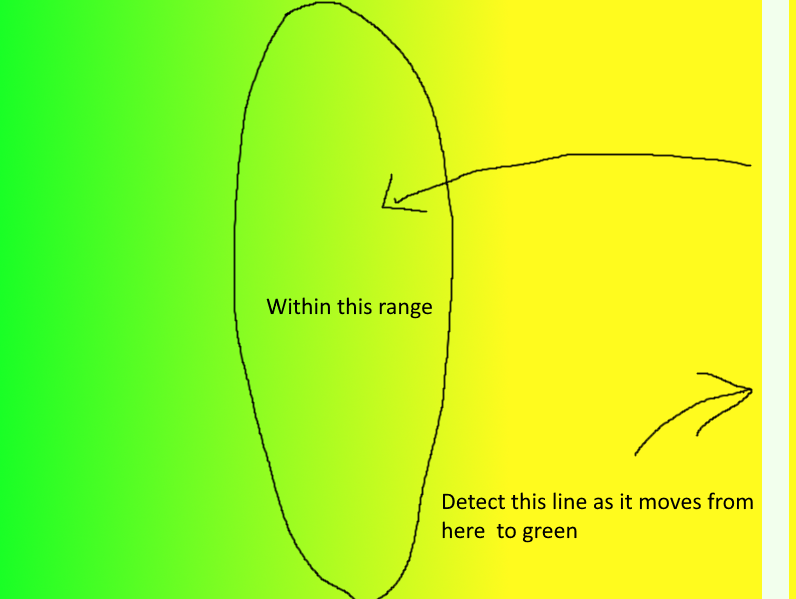
[enter image description here][1]Im working on a project where im trying to trace a white line passing from yellow to green colour, once the line has been passed I want Perfect to be printed just once at the point in which it crosses I've written this code but it doesn't quite work.
I've tried adding a pixel counter to detect a change of pixel colour from the last seen frame but to no avail
import cv2
import numpy as np
import time

# Specifying upper and lower ranges of color to detect in hsv format
lower = np.array([35, 100, 140])
upper = np.array([70, 255, 255]) # (These ranges will detect Yellow)

# Capturing webcam footage
cap = cv2.VideoCapture(0)

prev_count = 0
curr_count = 0
frame_count = 0
perfect_printed = False
last_perfect_time = 0

while True:
    success, video = cap.read() # Reading webcam footage

    img = cv2.cvtColor(video, cv2.COLOR_BGR2HSV) # Converting BGR image to HSV format

    mask = cv2.inRange(img, lower, upper) # Masking the image to find our color

    mask_contours, hierarchy = cv2.findContours(mask, cv2.RETR_EXTERNAL, cv2.CHAIN_APPROX_SIMPLE) # Finding contours in mask image

    # Finding position of all contours
    if len(mask_contours) != 0:
        for mask_contour in mask_contours:
            area = cv2.contourArea(mask_contour)
            if area > 5 and area < 30:
                x, y, w, h = cv2.boundingRect(mask_contour)
                cv2.rectangle(video, (x, y), (x + w, y + h), (0, 0, 255), 1) #drawing rectangle
                curr_count += area

    cv2.imshow("mask image", mask) # Displaying mask image

    cv2.imshow("window", video) # Displaying webcam image

    # Check if the pixel count has decreased by more than 10 in 2 frames
    if frame_count == 1:
        if (prev_count - curr_count) > 9 and not perfect_printed and time.time() - last_perfect_time > 2:
            print("Perfect")
            cv2.imwrite('perfect_screenshot.jpg', video)
            perfect_printed = True
            last_perfect_time = time.time()
        prev_count = curr_count
        curr_count = 0
        frame_count = 0
    else:
        frame_count += 1

    # Reset perfect_printed if it has been printed before
    if perfect_printed:
        perfect_printed = False

    # Wait for user to press Esc key to close the window
    if cv2.waitKey(1) == 27:
        break

cap.release()
cv2.destroyAllWindows()
Image 1 https://i.gyazo.com/86dc470ddd18b901b0bf8bb7c578c87e.png
to